Managing conference calls in the
RingCentral
app and Admin Portal
===================================================================================================================================
You can use the
RingCentral
app to bring multiple participants together on an audio conference call. You can also invite participants to future conference calls using the app and Admin Portal, and keep your conference calls active if you need to leave as the host.
Note
Admins need to turn on a setting to [allow hosts to leave conference calls](https://support.ringcentral.com/article-v2/Starting-a-conference-call-in-the-RingCentral-app.html?brand=RingCentral&product=RingEX&language=en_US&pills-nav=admin_portal "") before they end.
Where do you want to start and manage your conference calls?
## Desktop & web
Starting a conference call in the desktop and web app
-----------------------------------------------------
You can click **Start conference call** in multiple areas of the app to initiate a call with multiple contacts.
### New actions plus icon
* Click the **New actions** plus icon at the upper right corner of the app.
* Select **Start a conference call** .

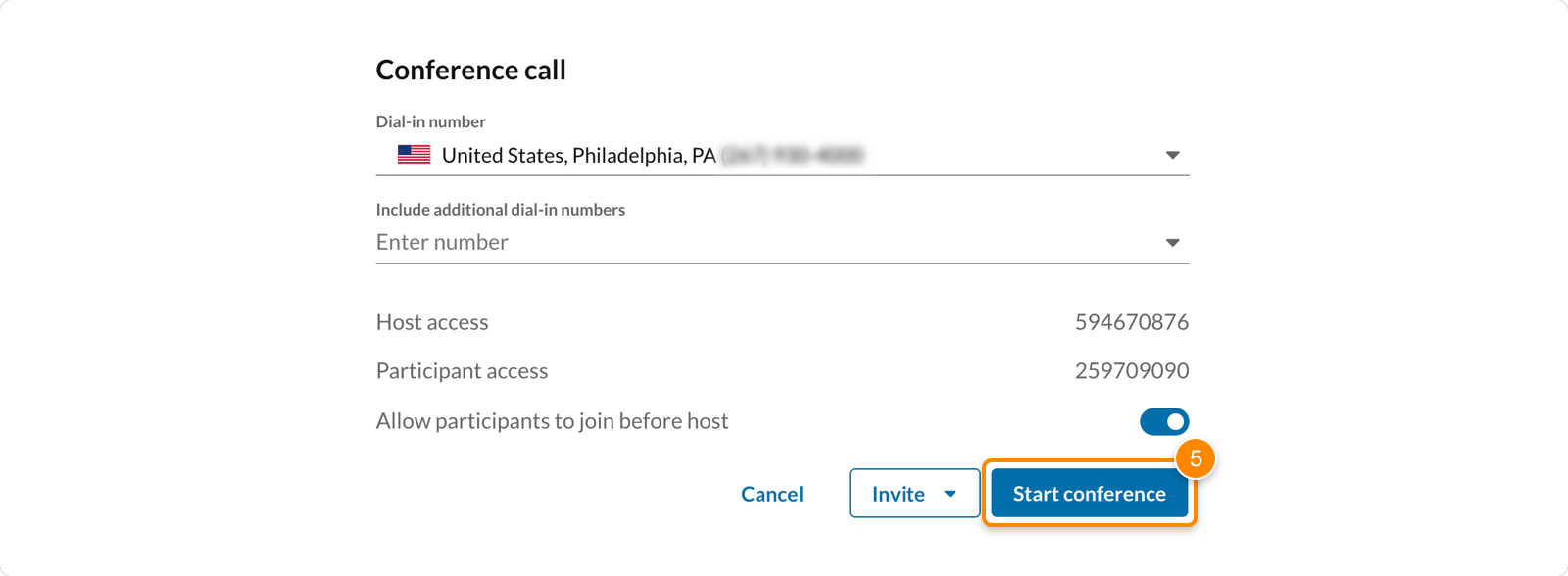
* The **Conference call** popup window will show your conferencing information.
* **Dial-in number**: Select the phone number that participants use to dial in to the conference call.
* **Include additional dial-in numbers**: Select additional phone numbers if you have participants joining from other countries.
* **Host and Participant access**: Access codes used to join the conference as the host or participant.
* **Allow participants to join before host**: Let participants join the conference call before the host joins.
* Click the **Invite** dropdown and choose how you'd like to invite participants.
* *Invite by Text* : Send a text message from your
RingCentral
phone number with the conference call information. Search for a contact or enter a number, then click **Send**. This option is only available to users with phone numbers registered to send text messages.
* *Invite by Email*: Send a message from your synced email account with the conference call information. Add contacts, then send the email.
* *Invite by Message* : Send a direct chat using the
RingCentral
app on your desktop or web browser with the conference call information. Enter your contacts' names or email addresses, then click **Send**.
* Click **Start conference** .
### Group chat or team
* In the navigation bar, click **Message**.
* Select a group or team conversation.
* Click the three-dot **More** icon (a) at the top right of the conversation, then select **Start conference call** (b).

* Click **Start** . The conference call will begin, and members of the team or group chat can click **Join** to connect to the call.
You can also [add participants to an active call](https://support.ringcentral.com/article-v2/Adding-participants-to-phone-calls-in-the-RingCentral-app.html?brand=RingCentral&product=RingEX&language=en_US "") to start a conference call.
## Mobile
Starting a conference call in the mobile app
--------------------------------------------
* In the bottom toolbar, tap **Phone**.
* Tap the **Conference call** icon at the top right to view your conferencing information.

* Your conference information will appear:
* **Dial-in number**: Select the phone number that participants use to dial in to the conference call.
* **Host and Participant access**: Access codes used to join the conference as the host or participant.
* **Allow participants to join before host**: Let participants join the conference call before the host joins.
* Tap **Invite** and choose how you'd like to invite participants.
* *Invite via Message* : Send a direct chat to your company or personal contacts with the conference call information. Enter the contact information, then tap **Send**.
* *Invite via Text* : Send a text message from your
RingCentral
phone number with the conference call information. Search for a contact or enter a number, then tap **Send**. This option is only available to users with phone numbers registered to send text messages.
* *Invite via email* : Open your preferred email app to start an email that includes your conference call information. Enter your contacts' email addresses, then tap **Send**.
* Tap **Start conference** .

You can also [add participants to an active call](https://support.ringcentral.com/article-v2/Adding-participants-to-phone-calls-in-the-RingCentral-app.html?brand=RingCentral&product=RingEX&language=en_US&pills-nav=mobile "") to start a conference call.
## Admin Portal
Allowing hosts to leave conference calls
----------------------------------------
Admins can update the account's general settings to allow users to leave conference calls they're hosting before the call ends.
* Sign in to the [
Admin Portal
](https://service.ringcentral.com "").
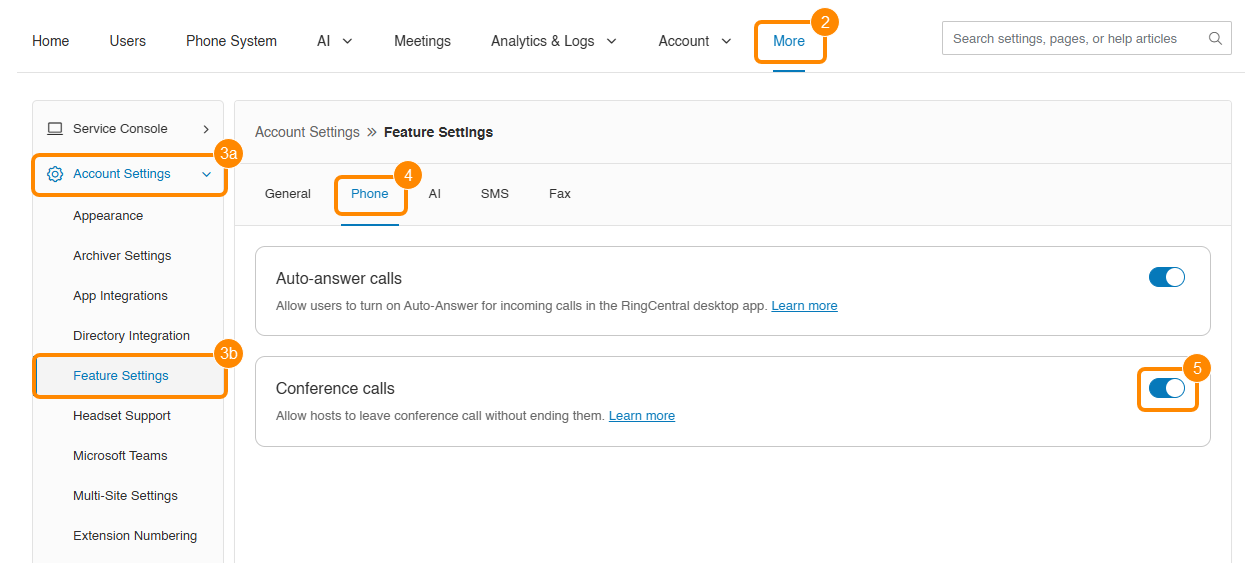
* Click the **More** tab.
* Click **Account Settings** (a), then click **Feature Settings** (b).
* Click the **Phone** tab.
* Click the **Conference calls** toggle on.
When this setting is turned on, it can be changed for individual users in their settings.
* Click **Users**.
* Select a user from the **Users with Extensions** list.
* Click **Devices \& Numbers**.
* Select the **Conference** tab.
* Click the **Allow user to leave conference calls without ending them** toggle on or off.
This feature can also be updated for multiple users at once by [creating a user settings template](https://support.ringcentral.com/article-v2/10588-user-templates-create-template.html?brand=RingCentral&product=RingEX&language=en_US "").

Important
If a user leaves a conference call without ending it, the call will continue to use your account's allocated minutes until it ends.
Inviting users to a conference call from the Admin Portal
---------------------------------------------------------
* Sign in to the [
Admin Portal
](https://service.ringcentral.com "").
* Click the **App selector** icon at the top right.
* Click the **Conference** icon.

* View the conference information, and click **Select** if you want to add international dial-in numbers.
* Click the **Enable join before host** checkbox to turn the feature on or off.
* Click **Invite with Email**.
* Add contacts and send the email.