Managing connected accounts in the
RingCentral
app
====================================================================================================================
You can view and manage your Microsoft, Google, or device calendars and contacts when you connect your accounts to the
RingCentral
app. When you connect your calendar, your scheduled meetings and events will appear in the app. Meetings created in the
RingCentral
app will also show up in your connected calendars.
You can also connect your personal contacts to collaborate with people outside of your company.
Select where you want to manage your connected accounts:
## Desktop & web
Connecting your accounts in the RingCentral desktop and web app
---------------------------------------------------------------
### Connecting your Microsoft or Google account
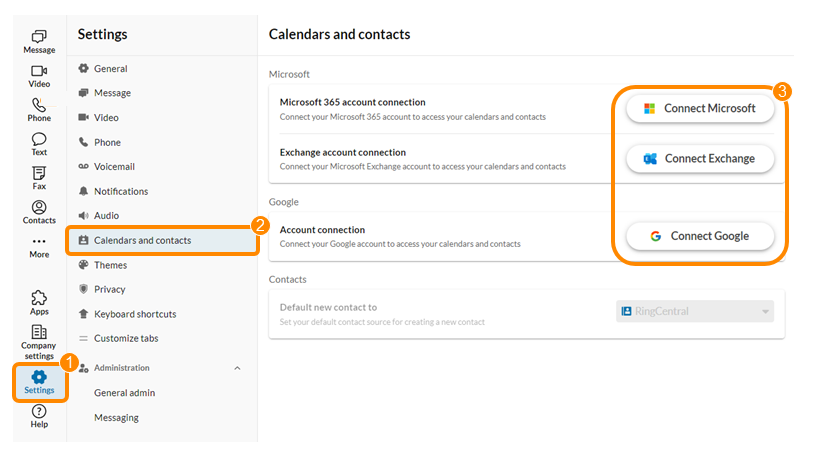
* In the navigation bar, click **Settings**.
* Click **Calendars and contacts**.
* Click the **Connect** for the account you'd like to connect.
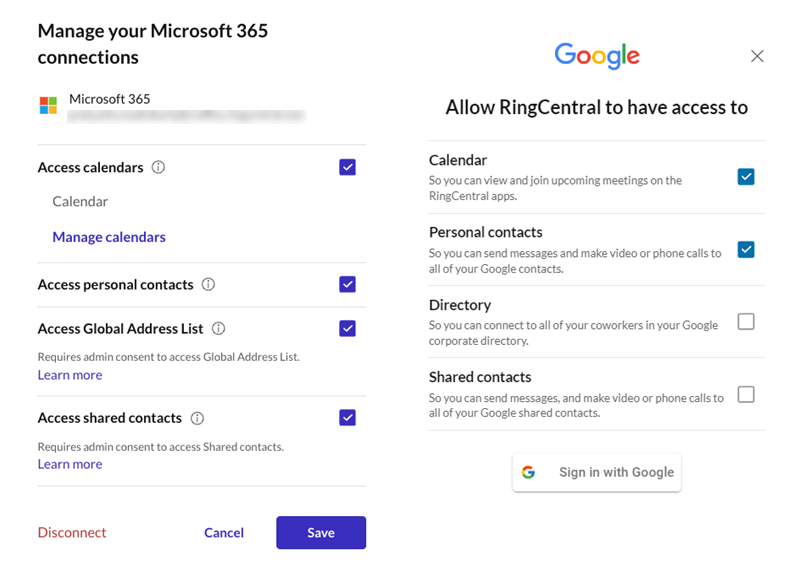
* **For Microsoft 365 and Google** : Check the appropriate boxes to allow RingCentral to access your calendar, contacts, global address list, directory, or shared contacts.
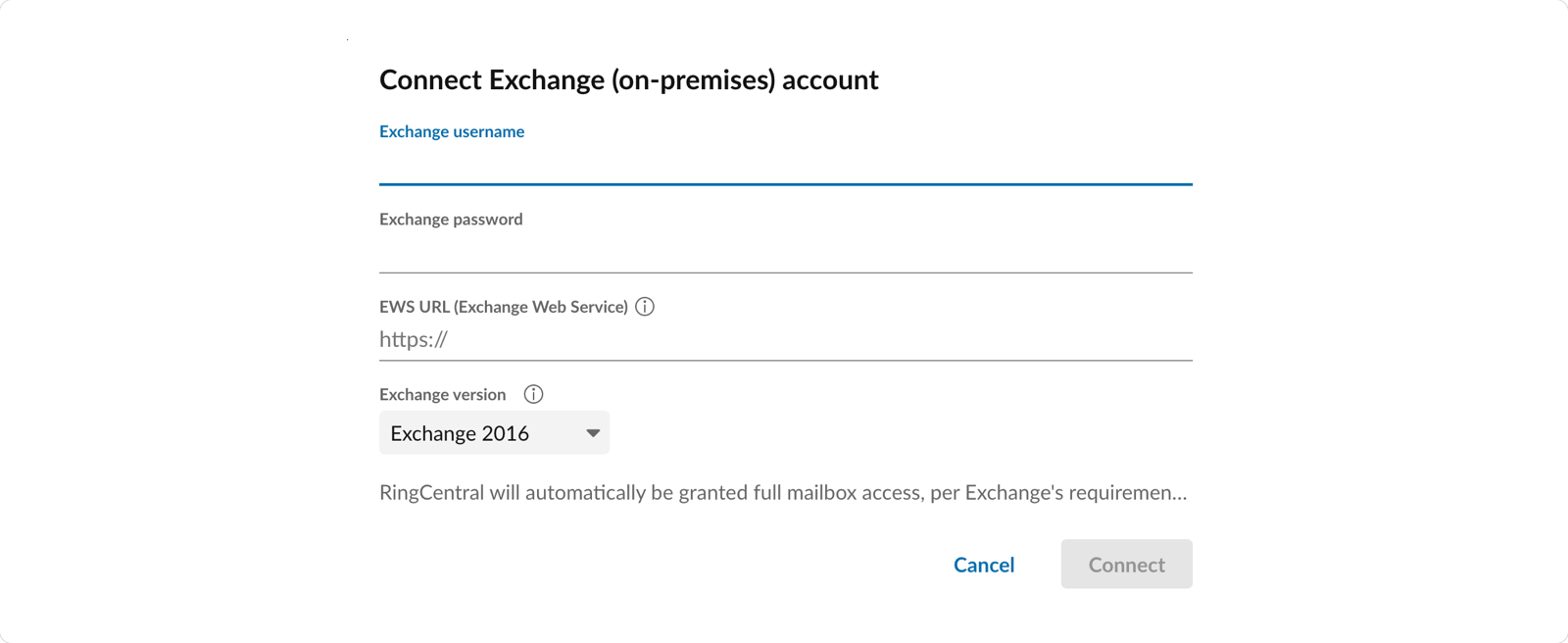
* **For Microsoft Exchange** : Enter your username, password, Exchange Web Service (EWS) URL, and version. Contact your IT admin if you don't know your EWS or version information.
* Click **Connect** or **Sign in with Google** to open the authentication page in your browser.
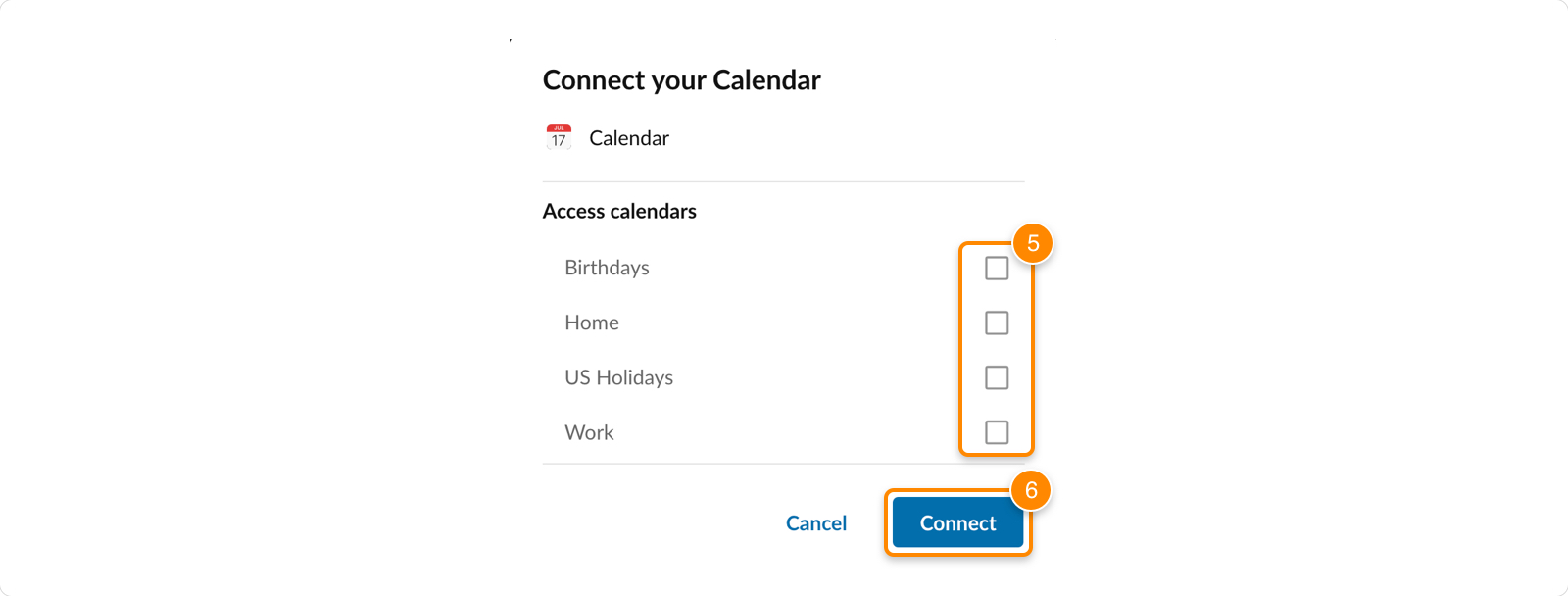
Note: If you're connecting your Exchange (on-premises) calendar, check **Access calendars** in the popup window.
* Select the account to allow access and sign in if requested, then click **Allow**.
* Click **Save**.
### Connecting your Apple calendar
* In the navigation bar, click **Settings**.
* Click **Calendars and contacts**.
* In the Apple section, click **Connect with Calendar** .

* Click **Continue** to allow RingCentral to access your Apple calendar.

* Under Calendar, check the box next to each calendar you'd like to connect.
* Click **Connect** .
Disconnecting your accounts, calendars, or contacts
---------------------------------------------------
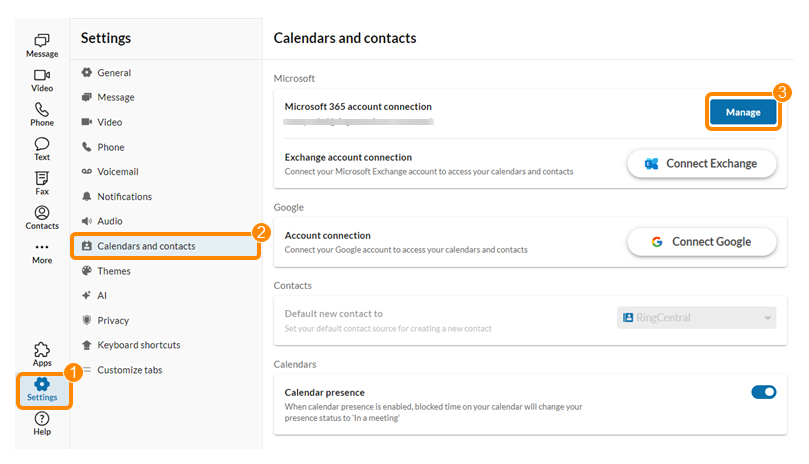
* In the navigation bar, click **Settings**.
* Click **Calendars and contacts**.
* Click **Manage** to the right of the account you'd like to update.
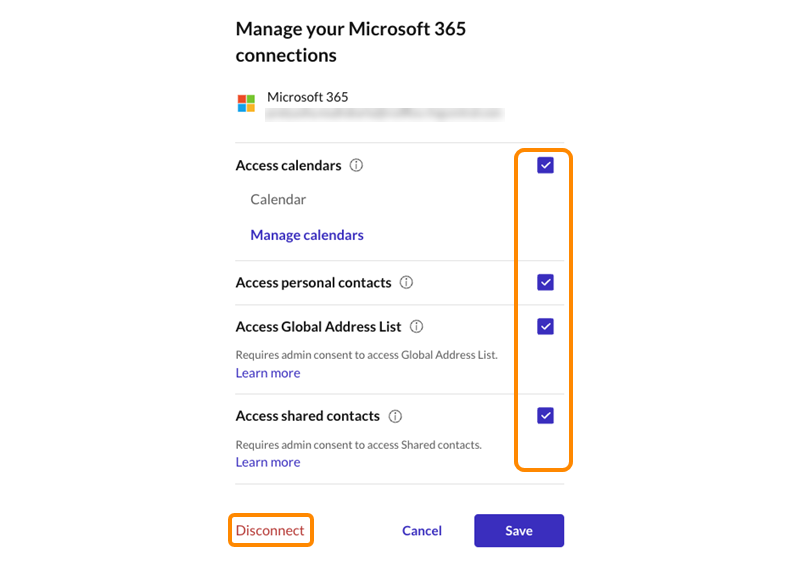
* You can uncheck individual boxes to remove RingCentral's access to your contacts, calendars, global address list, or shared contacts, then click **Save** . To disconnect the entire account from RingCentral, click **Disconnect** , then click **Disconnect** again to confirm.
Granting admin consent to the Global Address List
-------------------------------------------------
Admin consent is only needed for users on your account to display the Global Address List in their RingCentral app. When a user in your organization clicks **Manage** within the RingCentral app **Settings** , the **Calendar Service** enterprise application is created in your Microsoft Azure Admin Portal.
To grant admin consent to the Global Address List:
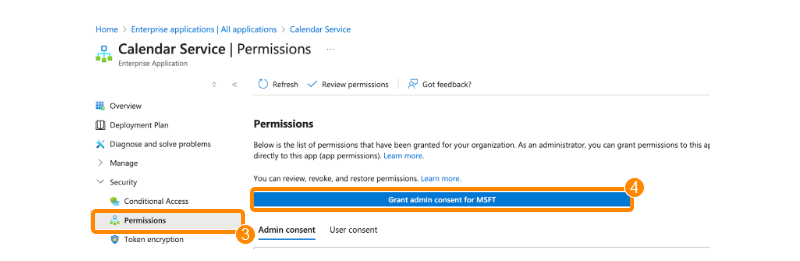
* Sign in to your Azure Admin Portal with Global Admin access.
* Open the **Calendar Service** app.
* In the navigation bar, click **Permissions**.
* Click **Grant admin consent for MSFT** .
This setting only needs to be updated once to allow users to show or hide the Global Address List in their RingCentral app.
Note: The Global Address List can also be connected to the [RingCentral for Microsoft Teams embedded app](https://support.ringcentral.com/article-v2/RingCentral-s-next-generation-integration-for-the-Microsoft-Teams-desktop-and-web-app.html?brand=RingCentral&product=RingEX&language=en_US "") in the Azure Admin Portal.
Managing account settings
-------------------------
### Contacts
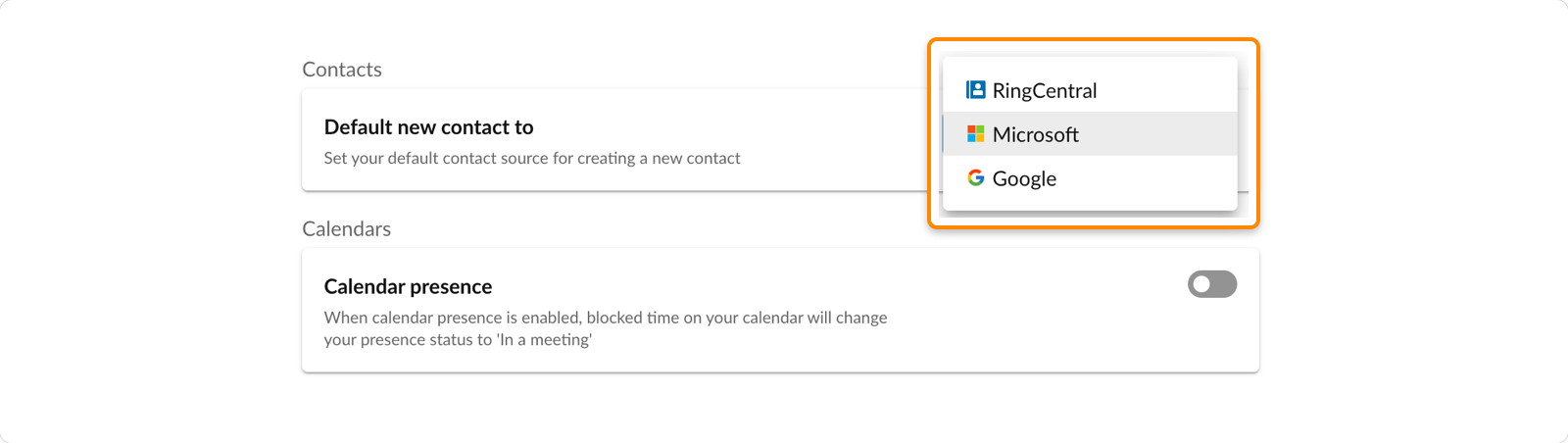
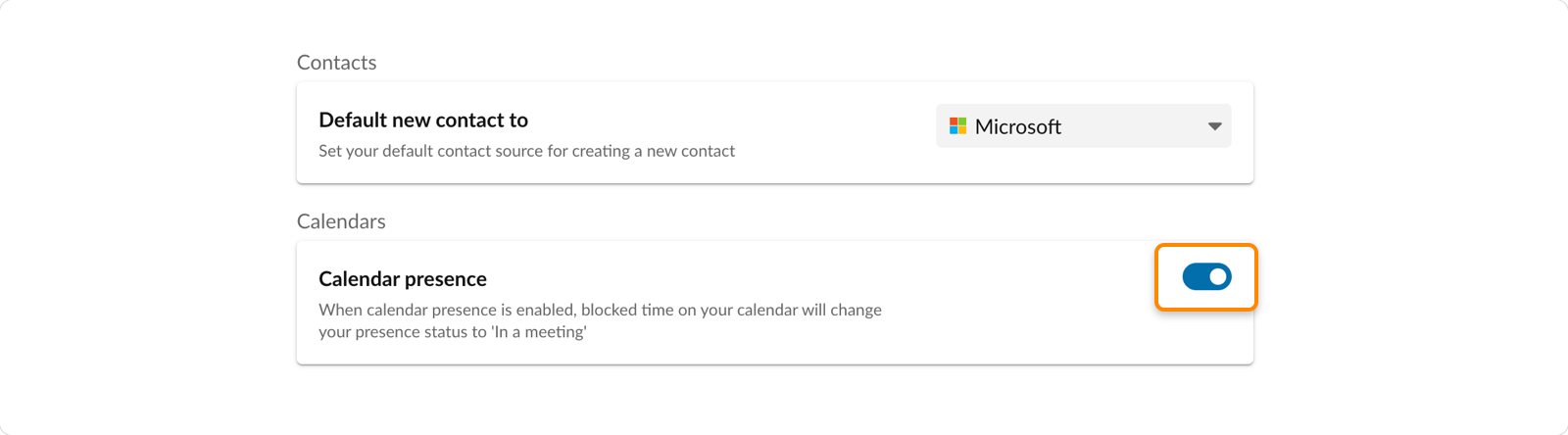
In the Contacts section, you can set your default contact source. Choose the account where new contacts will be saved:
Note: If you choose an account that you haven't connected yet, new contacts won't appear in RingCentral until you connect the account. Connect the account to view its contacts in the RingCentral app.
* **Default new contact to** : Set the default destination for new contacts. Options may include:
* *RingCentral*: Contacts created in the RingCentral app will be saved to your personal contacts page in the app.
* *Microsoft*: New contacts will be saved in your Microsoft account, as well as in your personal contacts in the RingCentral app.
* *Google* : New contacts will be saved in your Google account, as well as in your personal contacts in the RingCentral app.
### Calendars
In the Calendars section, click the **Calendar presence** toggle on or off. When your Calendar presence is turned on, your [presence status](https://support.ringcentral.com/article-v2/Setting-your-presence-in-the-RingCentral-app.html?brand=RingCentral&product=RingEX&language=en_US "") will automatically show that you're busy during blocked time in your calendar.
## Mobile
Connecting your accounts in the RingCentral mobile app
------------------------------------------------------
### Connecting your Microsoft or Google account
* In the top left, tap your profile picture.
* Tap **Calendars and contacts**.
* Tap **Connect** next to the account you'd like to connect.

* For **Microsoft 365** or **Google**:
* Tap the appropriate options to allow RingCentral to access your calendar, contacts, global address list, shared contacts, or Google Drive. You can update RingCentral's access at any time after you connect the account.
* Tap **Continue** for Microsoft or **Sign in with Google** for Google.
* Sign in to your account, then tap **Allow**.
* For **Microsoft Exchange** :
* Enter your username, password, Exchange Web Service (EWS) URL, and version. Contact your IT admin if you don't know your EWS or version information.
* Tap **Connect**.
* Tap the toggle to allow RingCentral to access your calendars, contacts, or directory. You can update RingCentral's access at any time.
### Connecting your device calendar or contacts
* Tap your profile picture at the top left.
* Tap **Calendars and contacts**.
* Tap **Connect** or **Manage** next to iPhone (iOS) or Device (Android).

* Tap the **Contacts** or **Calendar** toggles on to grant RingCentral access to your device's contacts or calendar.

Disconnecting your accounts, calendars, or contacts
---------------------------------------------------
* Tap your profile picture at the top left.
* Tap **Calendars and contacts**.
* Tap **Manage** next to the account you'd like to update.
* You can use the toggles to turn off RingCentral's access to your contacts or calendars, then tap **Save** . To disconnect the entire account from RingCentral, tap **Disconnect** , then tap **Disconnect** again to confirm.
Managing account settings
-------------------------
### Calendars
In the Calendars section, click the **Enable calendar presence** toggle on or off. When Calendar presence is turned on, your [presence status](https://support.ringcentral.com/article-v2/Setting-your-presence-in-the-RingCentral-app.html?brand=RingCentral&product=RingEX&language=en_US "") will automatically change to *Busy* during blocked time in your calendar.

### Contacts
In the Contacts section, you can set your default contact source. Choose the account where new contacts will be saved:
Note: If you choose an account that you haven't connected yet, new contacts won't appear in RingCentral until you connect the account. Connect the account to view its contacts in the RingCentral app.
* **Default new contact to** : Set the default destination for new contacts. Options may include:
* *RingCentral*: Contacts created in the RingCentral app will be saved to your personal contacts page in the app.
* *iPhone or Device*: New contacts will be saved in your iPhone's or device's contacts, as well as in your personal contacts on the RingCentral app.
* *Microsoft 365 or Exchange (on-premises)*: New contacts will be saved in your Microsoft account, as well as in your personal contacts in the RingCentral app.
* *Google*: New contacts will be saved in your Google account, as well as in your personal contacts in the RingCentral app.
* *Always ask*: Every time you create a new contact, you'll be asked where you want to save it.