app
===============================================================================================================
\\\Your browser does not support the iframe element.\
For more videos like this, visit [RingCentral University](https://university.ringcentral.com/ "").
With the team huddle feature, you can:
* Start a team huddle to get together for informal and unscheduled meetings.
* Create less disruption because, unlike starting a video call, a team huddle doesn't ring the team members.
* Notify your team members about an ongoing team huddle easily as it will automatically post a message in your team conversation after starting the huddle.
* Allow team members to decide whether they want to join.
Note: To use the team huddle feature, your video service must be
RingCentral
Video
and you must not be a guest user on the team.
Select where you want to start a team huddle.
## Desktop & web
* Go to **
Message
** in the navigation bar.
* Select a team conversation with the relevant members you want invited to the huddle.
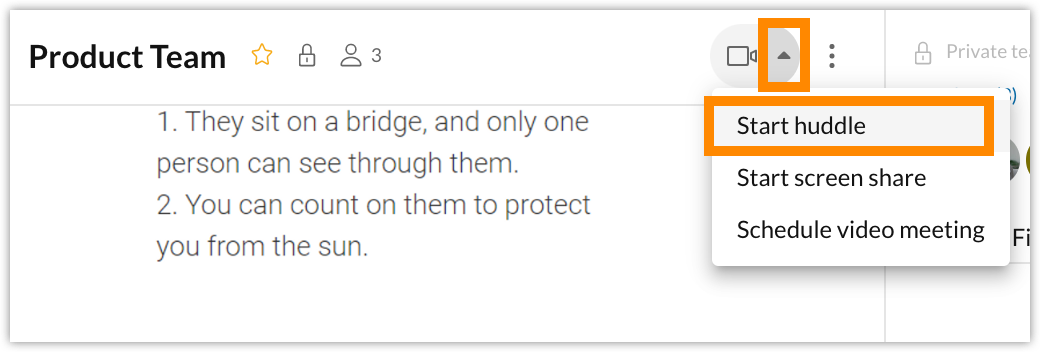
* Click the downward arrow beside the camera icon in the upper right.
* Choose *Start huddle* from the dropdown menu.
* Enter the name of your huddle in the **Topic**field (optional).
* Click **Start huddle**.

Team members will see a notification banner, message card, and indicator that a huddle has started, and its topic name, if one was provided. Anyone who receives a notification can join. To learn more about joining a meeting, see [Joining a meeting in the
RingCentral
app desktop and web](https://support.ringcentral.com/article-v2/Joining-a-RingCentral-Video-meeting.html?brand=RingCentral&product=RingEX&language=en_US "").
Huddle notifications remain active until all attendees have left the meeting, when the message card changes to indicate that the huddle has ended.
Note that there can be only one huddle per team at a time.
## Mobile
* Go to **
Message
** in the bottom menu bar.
* Select a team conversation.
* Tap the video camera icon at the top right, then tap **Start huddle** .
 
* Enter a topic for the huddle, then tap **Done** .
OR
Tap **Skip** to leave the topic blank.