Accessing, managing, and sending voicemail messages
===================================================
When you miss a phone call and the caller leaves a message, you can access voicemails in the
RingCentral
app, the Admin Portal, or by calling in using a different phone. You can create new messages, reply to messages, and forward voicemails to multiple users without ringing the recipient's phone.
Learn more about [creating a custom voicemail greeting](https://support.ringcentral.com/article-v2/Setting-up-your-voicemail-greeting.html?brand=RingCentral&product=RingEX&language=en_US "") and how to get [voicemail transcripts](https://support.ringcentral.com/article-v2/8045.html?brand=RC_US&product=RingEX&language=en_US&pills-nav=desktop_%26_web "").
Where do you want to access and manage your voicemail messages?
## Desktop & web
Accessing and managing voicemails in the desktop and web app
------------------------------------------------------------
To access your personal or [shared voicemails](https://support.ringcentral.com/article-v2/Managing-shared-voicemails.html?brand=RingCentral&product=RingEX&language=en_US ""):
* In the navigation bar, click **Phone**.
* Click the **Voicemail** tab. Note: If you're a shared voicemail co-recipient, click the name of the inbox to view and manage its messages.
* In the left panel, click a voicemail to open the detailed view that includes the caller's name and phone number. From here you may have some or all of the following options:
* **Mark as read/unread**: Click the flag icon at the top right to mark the voicemail as read or unread.
* **Delete** : Click the **Trash** icon at the top right to delete the voicemail. Click **Delete** in the popup to confirm.
* **Copy** : Click the **Copy** icon next to the caller's number to add it to your clipboard.
* **Phone**: Call the number.
* **Text**: Text the number.
* **
Message
**: Send a chat message to the user if they use the Chat feature.
* **Video**: Start or schedule a video meeting.
* **Add contact**: Click to create a new personal contact or add the number to an existing contact.
* **Fax**: Send a fax to the number.
* **Block number** : Block the contact who left the voicemail. (external contacts only). Click **Block** or **Block and report spam** in the popup to confirm.
* **Play/Pause** : Play or pause the voicemail.
* Click the **1x** icon to change the playback speed.
* **Download**: Download an MP3 audio file of the voicemail.
* **Forward** : Click the three-dot **More** icon to forward the message directly to an extension's voicemail box with or without an introduction.
* **Reply** : Click the three-dot **More** icon to record a reply message that will be sent directly to the recipient's voicemail box.
* **Share** : Click the three-dot **More** icon to send a copy of the voicemail in a message, SMS text, or attached to an email.

You can also hover over the voicemail in the left panel to access some of the controls. Click the three-dot **More** icon at the far right to show additional options.

Managing voicemails in bulk
---------------------------
To manage more than one voicemail at a time:
* In the navigation bar, click **Phone**.
* Click the **Voicemail** tab.
* Click **Edit** at the top right of the voicemail list.
* Check the boxes next to the voicemails you want to manage or click the top checkbox to **Select all** . You may need to scroll down for all the voicemails to load in the panel view.
* Click the **Flag** icon to mark them all as read or unread.
* Click the trash can **Delete** icon to permanently delete them all. Click **Delete** in the popup box to confirm.

Sending a new voicemail
-----------------------
If you want to send a new voicemail to more than one person in your organization, or if you want to send a voicemail without ringing the recipient's extension:
* In the navigation bar, click **Phone**.
* Click the **Voicemail** tab.
* Click the **Send new voicemail** icon.

* Enter the names or extension numbers.
* Click the **Record** icon to record your message.
* When done, you can preview and re-record the voicemail message.
* Click the **Urgent message** checkbox if you want to mark the voicemail as urgent.
* Click the **Private message** checkbox, if available, to send a message that can't be downloaded or forwarded.
* Click **Send** .

The message will be delivered directly to the recipient's voicemail box, and they'll get a new voicemail notification.
Replying to a voicemail
-----------------------
If you receive a voicemail from someone within your company, you can reply by recording and sending a voice message.
* In the navigation bar, click **Phone**.
* Click the **Voicemail** tab.
* Click the three-dot **More** icon next to the sender's voicemail message.
* Click **Reply** .

* The sender's name will appear in the **To:** field. Click the **Record** icon to record your message.
* Click the **Urgent message** checkbox if you want to mark the voicemail as urgent.
* Click the **Private message** checkbox, if available, to send a message that can't be downloaded or forwarded.
* Click **Send** .

The message will be delivered directly to the recipient's voicemail box, and they'll get a new voicemail notification.
Forwarding a voicemail
----------------------
You can forward a voicemail message to one or more recipients and add an introduction to help give the message context. Forwarded messages will be delivered without ringing the recipient's extension.
* In the navigation bar, click **Phone**.
* Click the **Voicemail** tab.
* Click the three-dot **More** icon next to the sender's voicemail message.
* Click **Forward** .

* Enter the names or extension numbers.
* Click the toggle to **Add an introduction** or leave it off if an introduction is not needed.
* Click the **Record** icon to record your introduction message.
* Click the **Urgent message** checkbox if you want to mark the voicemail as urgent.
* Click the **Private message** checkbox, if available, to send a message that can't be downloaded or forwarded.
* Click **Send** .

**Additional resources**
[Setting up your voicemail greeting](https://support.ringcentral.com/article-v2/Setting-up-your-voicemail-greeting.html?brand=RingCentral&product=RingEX&language=en_US&pills-nav=desktop_%26_web "")
[Setting up voicemail-to-text](https://support.ringcentral.com/article-v2/8045.html?brand=RC_US&product=RingEX&language=en_US&pills-nav=desktop_%26_web "")
[Managing shared voicemail recipients](https://support.ringcentral.com/article-v2/Managing-shared-voicemails.html?brand=RingCentral&product=RingEX&language=en_US&pills-nav=desktop_%26_web "")
## Mobile
Accessing and managing voicemails in the mobile app
---------------------------------------------------
To access your personal or [shared voicemails](https://support.ringcentral.com/article-v2/Managing-shared-voicemails.html?brand=RingCentral&product=RingEX&language=en_US ""):
* In the bottom toolbar, tap **Phone**.
* Tap the **Voicemail** tab. Note: If you're a shared voicemail co-recipient, tap the name of the inbox to view and manage its messages.
* From the list, you can sort by **All** or **Unread** voicemails.
* Tap a voicemail in the list to open a detailed view that includes the caller's name and phone number. From here you may have some or all of the following options:
* **Mark as read/unread**: Tap the flag icon to mark the voicemail as read or unread.
* **Delete** : Tap the trash icon to delete the voicemail. Tap **Delete** to confirm.
* **Phone**: Call the number.
* **Text**: Text the number.
* **Message**: Send a chat message to the user if they use the messaging feature.
* **Video**: Start or schedule a video meeting.
* **Info**: View the caller's profile.
* **Play/Pause**: Play or pause the voicemail.
* **Forward**: Forward the message directly to an extension's voicemail box with or without an introduction.
* **Reply**: Record a reply that will be sent directly to the recipient's voicemail box.
* **Share**: Tap to share the message as an MP3 audio file.
* **Create new contact**: Scroll down to add the caller as a new personal contact.
* **Add to existing contact**: Scroll down to add the phone number to an existing contact.
* **Block number** : Scroll down to block the contact who left the voicemail. Click **Block** or **Block and report spam** to confirm.

### Additional options for iOS devices
When viewing the main list of voicemails, you can:
* Swipe right to mark the voicemail as read or unread.
* Swipe left to call the number, delete the voicemail, or tap **More** to:
* Share the audio file
* Select multiple voicemails to delete or mark as read/unread
* Copy the number to your clipboard
### Additional options for Android devices
When viewing the main list of voicemails, tap and hold the message to:
* Mark as read/unread
* Call the number
* Delete the voicemail
* Share the audio file
* Select multiple voicemails to delete at once
* Copy the number to your clipboard
Sending a new voicemail
-----------------------
If you want to send a new voicemail to more than one person in your organization, or if you want to send a voicemail without ringing the recipient's extension:
* In the bottom toolbar, tap **Phone**.
* Tap the **Voicemail** tab.
* Tap the three-dot **More** icon at the top right.
* Tap **New voicemail**.
* Enter the names, extension numbers, or voicemail distribution lists.
* Tap the **Record** icon to record your message.
* Tap the**Urgent message** toggle on if you want to mark the message as urgent.
* Tap **Send** .

* The message will be delivered directly to the recipient's voicemail box and they'll get a new voicemail notification.
Replying to a voicemail
-----------------------
If you receive a voicemail from someone within your company, you can reply by recording and sending a voice message.
* In the bottom toolbar, tap **Phone**.
* Tap the **Voicemail** tab.
* Swipe left (iOS) or tap and hold (Android) on the sender's voicemail message
* Tap **Reply**.
* The sender's name will appear in the **To:** field. Tap the **Record** icon to record your message.
* Tap the **Urgent message** toggle on if you want to mark the message as urgent.
* Tap **Send** .

The message will be delivered directly to the recipient's voicemail box and they'll get a new voicemail notification.
Forwarding a voicemail
----------------------
You can forward a voicemail message to one or more recipients and add an introduction to help give the message context. Forwarded messages will be delivered without ringing the recipient's extension.
* In the bottom toolbar, tap **Phone**.
* Tap the **Voicemail** tab.
* Swipe left (iOS) or tap and hold (Android) on the sender's voicemail message.
* Tap **Forward**.
* Enter the names or extension numbers.
* Tap the toggle to **Forward with an introduction** or leave it off if an introduction is not needed.
* Tap the **Record** icon to record your introduction message.
* Tap the**Urgent message**toggle on if you want to mark the message as urgent.
* Tap **Send** .

**Additional resources**
[Setting up your voicemail greeting](https://support.ringcentral.com/article-v2/Setting-up-your-voicemail-greeting.html?brand=RingCentral&product=RingEX&language=en_US&pills-nav=mobile "")
[Setting up voicemail-to-text](https://support.ringcentral.com/article-v2/8045.html?brand=RC_US&product=RingEX&language=en_US&pills-nav=mobile "")
[Managing shared voicemail recipients](https://support.ringcentral.com/article-v2/Managing-shared-voicemails.html?brand=RingCentral&product=RingEX&language=en_US&pills-nav=mobile "")
## Over the phone
Accessing and managing voicemail messages over the phone
--------------------------------------------------------
You have two options when checking your voicemail messages over the phone:
* Using your deskphone:
* Press **\*86**
* Enter your PIN, then press **#**.
* Using a separate mobile or landline phone:
* Call your direct number or main number.
* Once you hear the system prompt start to play, press **\***.
* Enter your PIN and press **#**.
* Press **1** to listen to your voicemails.
After listening to the voicemail, use these key presses to manage the message:
|---------------|------------------------------------------------------------------|
| **Key** | **Function** |
| 1 | **Repeat** the voicemail |
| 2 | **Save** the voicemail |
| 3 | **Erase** the voicemail |
| 4 | **Return** the call |
| 5 | [**Forward** the voicemail to another extension](#forwarding "") |
| 6 | [**Reply** to the voicemail](#replying "") |
| 7 | **Skip** the voicemail |
| \* (star key) | **Exit** voicemail |
Forwarding a voicemail
----------------------
You can forward a voicemail message to [an individual or voicemail distribution list](https://support.ringcentral.com/article-v2/managing-voicemail-distribution-lists-in-the-ringcentral-app-and-admin-portal.html?brand=RingCentral&product=RingEX&language=en_US&pills-nav=admin_portal "") and add an introduction to help give the message context. Forwarded messages will be delivered without ringing the recipient's extension.
* Dial **\*86** on your deskphone to access your voicemail, then enter your PIN and press **#**.
* Press **1** to listen to your voicemail.
* Press **5** to forward the message.
* Press **1** to forward without an introduction. Go to step 4.
* Press **2** to add an introduction.
* Record your introduction, then press the **#** key. After recording:
* Press **1** to listen to your message.
* Press **2** to erase and re-record your message.
* Press **3** to send the message.
* Press **4** to send the message as urgent.
* Press **5** to send the message as private.
* Press **6** to send the message as private and urgent.
* Enter the extension of the recipient, then press**#** . Or press **#** for more options:.
* Press **1** to enter the recipient's name.
* Press **2** to say the recipient's name.
* Press **3** to select a voicemail distribution list.
* Press **\*** to return to the previous menu.
* After the recipient is selected:
* Press**1** to send the message.
* Press**2** to change the extension to where the message will be delivered.
* Press**3** to add more voicemail distribution lists.
* Press**\*** to return to the previous menu.
Voicemail recipients can hear who else received the message.

Replying to a voicemail with a message
--------------------------------------
If you receive a voicemail from someone within your company, you can reply by recording and sending a voice message. The message is delivered directly to their voicemail inbox.
* Dial **\*86** on your deskphone to access your voicemail, then enter your PIN and press **#**.
* Press **1** to listen to your voicemail.
* Press **6** to reply to the message.
* Record your message, then press the **#** key. After recording:
* Press **1** to listen to your message.
* Press **2** to erase and re-record your message.
* Press **3** to send the message.
* Press **4** to send the message as urgent.
* Press**5** to send the message as private.
* Press**6** to send the message as private and urgent.
* Press **\*** to return to the previous menu.

Sending a new voicemail
-----------------------
If you want to send a voicemail to an individual or [voicemail distribution list](https://support.ringcentral.com/article-v2/managing-voicemail-distribution-lists-in-the-ringcentral-app-and-admin-portal.html?brand=RingCentral&product=RingEX&language=en_US&pills-nav=admin_portal ""), or if you want to send a voicemail without ringing the recipient's extension:
* Dial **\*86** on your deskphone to access your voicemail, then enter your PIN and press **#**.
* Press **4** to create a new voicemail message.
* Record your message, then press the **#** key. After recording:
* Press **1** to listen to your message.
* Press **2** to erase and re-record your message.
* Press **3** to send the message.
* Press **4** to send the message as urgent.
* Press **5** to send the message as private.
* Press **6** to send the message as private and urgent.
* Press **\*** to return to the previous menu.
* Enter the extension of the recipient, then press**#** . Or press **#** for more options:
* Press **1** to enter the recipient's name.
* Press **2** to say the recipient's name.
* Press **3** to select a voicemail distribution list.
* Press **\*** to return to the previous menu.
* After the recipient is selected:
* Press **1** to send the message.
* Press **2** to change the extension to where the message will be delivered.
* Press **3** to add more voicemail distribution lists.
* Press**\*** to return to the previous menu.
Voicemail recipients can hear who else received the message.

## Admin Portal
Accessing and managing voicemail messages in the Admin Portal
-------------------------------------------------------------
* Sign in to the [
Admin Portal
](https://service.ringcentral.com "").
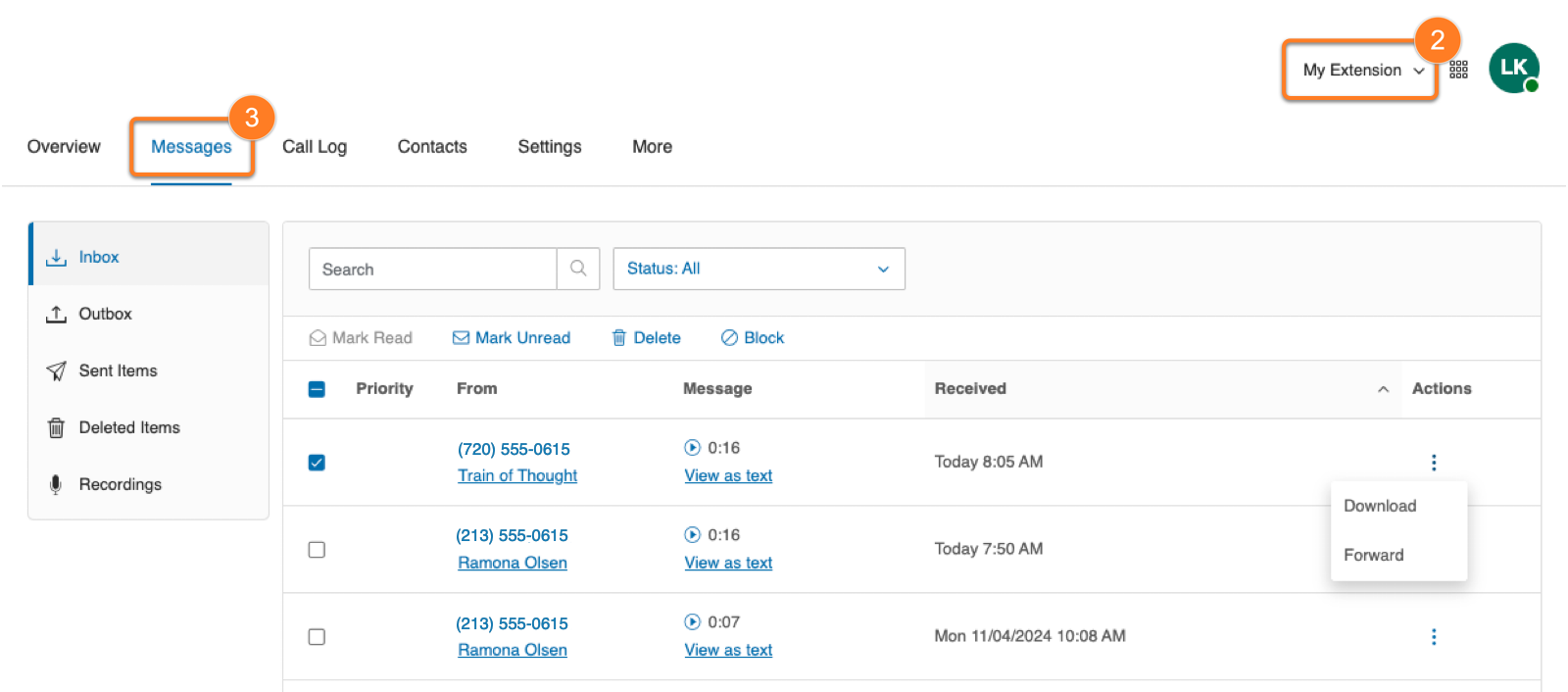
* At the top right, click **Admin Portal \> My Extension**.
* Click the **Messages** tab to view your Inbox. Note: Received faxes will also be accessible in the inbox.
From here you can:
* **Play**: Click the play button to listen to the voicemail. Use the slider to fast-forward or rewind.
* **Call** : Click the phone number to call using [RingOut](https://support.ringcentral.com/article-v2/Turning-on-and-using-RingOut-in-the-RingCentral-app.html?brand=RingCentral&product=RingEX&language=en_US&pills-nav=admin_portal "").
* **Add contact**: Click the sender's name to add them as a contact or view their details.
* **View as text**: View the voicemail transcript.
* **More** : Click the three-dot **More** icon for these options:
* **Download**: Download the voicemail as an MP3 audio file.
* **Forward**: Forward the voicemail by email. You can enter email addresses or select names from your contacts.
Check the box to the left of one or more voicemails to:
* **Mark Read**: Mark the voicemail as read.
* **Mark Unread**: Mark the voicemail as unread.
* **Delete** : Delete the voicemail. In the popup window, click **Yes** to confirm.
Tip
You can restore deleted voicemail messages by clicking Deleted Items in the left panel, check the box next to the message, then click **Restore** at the top of the list.
* **Block**: Block the number.
**Additional resources**
[Setting up your voicemail greeting](https://support.ringcentral.com/article-v2/Setting-up-your-voicemail-greeting.html?brand=RingCentral&product=RingEX&language=en_US&pills-nav=admin_portal "")
[Managing voicemail distribution lists](https://support.ringcentral.com/article-v2/managing-voicemail-distribution-lists-in-the-ringcentral-app-and-admin-portal.html?brand=RingCentral&product=RingEX&language=en_US+&pills-nav=admin_portal "")
[Setting up voicemail-to-text](https://support.ringcentral.com/article-v2/8045.html?brand=RC_US&product=RingEX&language=en_US&pills-nav=admin_portal "")
[Managing shared voicemail recipients](https://support.ringcentral.com/article-v2/Managing-shared-voicemails.html?brand=RingCentral&product=RingEX&language=en_US&pills-nav=admin_portal "")