Turning on on-demand or automatic call recording in the Admin Portal
====================================================================
You can set up call recording in the
RingCentral
Admin Portal using two options:
* **On-demand call recording**: Users can manually record calls by pressing a button. A notification plays to callers when the recording starts and stops.
* **Automatic call recording (ACR)**: Recording starts at the beginning of each call and stops when the call ends. This is turned off by default.
You can turn on both types in your account, but only one can be active during a call. If automatic recording is on, it takes priority, and on-demand recording won't be available.
**Note**
The Admin Portal has a[new company settings layout](https://support.ringcentral.com/article-v2/using-the-new-company-settings-layout-in-the-admin-portal.html?brand=RingCentral&product=RingEX&language=en_US ""). When you select **On-demand** and **Automatic** , you'll access the instructions for the new layout. If you're not using the new layout, select **On-demand classic view** and **Automatic classic view**.
Which type of recording would you like to turn on?
## On-demand
Setting up on-demand call recording
-----------------------------------
**Note**
If you're using the classic Admin Portal view, go to [Setting up on-demand call recording using the classic view](https://support.ringcentral.com/article-v2/Turning-on-on-demand-or-automatic-call-recording-.html?brand=RingCentral&product=RingEX&language=en_US&pills-nav=on-demand_classic_view#on-demand-call-recording "").
You can set up on-demand call recording so users in your phone system can manually record calls from their devices. On-demand call recordings are saved for 90 days.
* Sign in to the [Admin Portal](https://service.ringcentral.com "").
* Click the **Phone System** tab.
* In the left panel, click **Company Call Handling** .
* If you have [multi-site support](https://support.ringcentral.com/article-v2/9894.html?brand=RingCentral&product=RingEX&language=en_US ""), go to [Setting up on-demand call recording by site](https://support.ringcentral.com/article-v2/Turning-on-on-demand-or-automatic-call-recording-.html?brand=RingCentral&product=RingEX&language=en_US&pills-nav=on-demand#setting-up-on-demand-call-by-site "").
* Under **Call recording** , click the **On-demand call recording** toggle on, or click the **Arrow** icon to open the Call Recording settings to turn it on.

* To create a custom voice message that plays when the recording starts or ends:
* Click **Edit** under**Announcement on Start** or **Announcement on Stop** .

* Select *Custom* from the **Set Greeting** dropdown, then choose how you want to record the announcement.
* **Computer Microphone**: Record your greeting using your computer's microphone.
* **Phone**: Receive a phone call to record your greeting.
* **Importing**: Upload an MP3 or WAV file.
* Click **Done**.
* Click **Save** .

Setting up on-demand call recording by site
-------------------------------------------
Call recording regulations vary by geographic region. If your account includes multiple sites, you can update call recording settings for each site individually.
On-demand site recording settings apply to user extensions assigned to the same site. If a user is assigned to a different site, the new site recording settings will be applied to that extension.
* Sign in to the [Admin Portal](https://service.ringcentral.com "").
* Click the **Phone System** tab.
* Go to **Sites**, then click the site you want to update.
* Click the **Company Call Handling** tab.

* Under **Call recording** , click the **On-demand call recording** toggle on, or click the**Arrow** icon to open the Call Recording settings to turn it on.

* Select if you want to **Use the Main site call recording settings** or **Use custom call recording settings** .
**Note**
If the option to select custom call recording is greyed out, an admin has selected **Use the Main site call recording settings for all sites** to prevent other site call recording settings from being changed individually. When this option is selected, the Main Site recording settings will be applied to all sites and locked for other site admins. If you have Main Site admin permissions, go to the Main Site's call recording settings and toggle it off.
* To create a custom voice message that plays when the recording starts or ends.
* Click **Edit** under**Announcement on Start** or**Announcement on Stop** .

* Select *Custom* from the **Set Greeting** dropdown, then choose how you want to record the announcement.
* **Computer Microphone**: Record your greeting using your computer's microphone.
* **Phone**: Receive a phone call to record your greeting.
* **Importing**: Upload an MP3 or WAV file.
* Click **Done**.
* Click **Save** .

**Additional resources**
[Managing call recordings in the RingCentral app and Admin Portal](https://support.ringcentral.com/article-v2/Accessing-and-downloading-RingCentral-call-recordings.html?brand=RingCentral&product=RingEX&language=en_US "")
[Recording phone calls in the RingCentral app](https://support.ringcentral.com/article-v2/Recording-phone-calls-in-the-RingCentral-app.html?brand=RingCentral&product=RingEX&language=en_US "")
## Automatic
Setting up automatic call recording
-----------------------------------
Note
If you're using the classic Admin Portal view, go to [Setting up automatic recording using the classic view](https://support.ringcentral.com/article-v2/Turning-on-on-demand-or-automatic-call-recording-.html?brand=RingCentral&product=RingEX&language=en_US&pills-nav=automatic_classic_view#automatic-call-recording "").
You can set up automatic call recording to record all calls for selected user or group extensions. Automatic call recordings are saved for 90 days. Each account can save up to 100,000 recordings. Automatic call recording is only available for customers with the Advanced and Ultra plans.
* Sign in to the [Admin Portal](https://service.ringcentral.com "").
* Click the **Phone System** tab.
* In the left panel, click **Company Call Handling** .
* If you have [multi-site support](https://support.ringcentral.com/article-v2/9894.html?brand=RingCentral&product=RingEX&language=en_US ""), go to [Setting up on-demand call recording by site](https://support.ringcentral.com/article-v2/Turning-on-on-demand-or-automatic-call-recording-.html?brand=RingCentral&product=RingEX&language=en_US&pills-nav=automatic#setting-up-on-demand-call-by-site "").
* Under **Call recording** , click the **Automatic call recording** toggle on, or click the **Arrow** icon to open the Call Recording settings to turn it on.

* Check or uncheck the box next to each optional setting.
* **Play periodic tones for outbound calls**: Plays a tone in fixed intervals as a reminder that the call is being recorded.
* **Play call recording announcement for outbound calls**: Plays a message informing the person answering that the call will be recorded.
* **Allow mute in auto call recording**: Allows the recording to be paused and then restarted to prevent sensitive information from being recorded.
* If you want to create a custom voice message that plays when the call starts:
* Click **Edit** under Announcement on Start.
* Select *Custom* from the **Set Greeting** dropdown, then choose how you want to record the announcement.
* **Phone**: Receive a phone call to record your greeting.
* **Computer Microphone**: Record your greeting using your computer's microphone.
* **Importing**: Upload an MP3 or WAV file.
* Click **Edit** under Extensions to Record to add the users and groups whose calls you want to record.

* Select a tab to add specific extensions. You can also search by name, department, and sites.
* Check the boxes under **Inbound** and **Outbound** to select the types of calls to record for the extensions. You can select the entire list by checking the boxes in the top row.
**Note**
Recording outbound calls is unavailable for Call Queues and Paging Only groups. If you turn on inbound automatic call recording for users assigned to a call queue, make sure you turn it on for the call queue itself as well.
* If you have outbound calls selected for extensions, you can check the boxes under **Smart ACR** .
Smart Automatic Call Recording (ACR) determines when to play a recording announcement based on the area code and number dialed. This reduces the number of times callers will disconnect after hearing a call recording notification unexpectedly.
* Calls to locations where one-party notification is required: Smart ACR will automatically record these calls. The
RingCentral
user is the party notified when the recording is started.
* Calls to locations where two-party notification is required: These calls won't be recorded.
* Click **Save** .

* Click **Save** on the main screen to complete the update.
Users will receive an email when they or a group they belong to is added to the list of extensions with automatic call recording turned on. This email is sent monthly to remind users that their calls are set up to automatically record.
Setting up automatic call recording by site
-------------------------------------------
Call recording regulations vary by geographic region. If your account includes multiple sites, you can update call recording settings for each site individually.
Automatic site recording settings apply to user extensions assigned to the same site. If a user is assigned to a different site, the new site recording settings will be applied to that extension.
* Sign in to the [Admin Portal](https://service.ringcentral.com "").
* Click the **Phone System** tab.
* Go to **Sites**, then click the site you want to update.
* Click the **Company Call Handling** tab.

* Under **Call recording** , click the **Automatic call recording** toggle on, or click the **Arrow** icon to open the Call Recording settings to turn it on.

* Select if you want to **Use the Main site call recording settings** or **Use custom call recording settings** .
**Note**
If the option to select custom call recording is greyed out, an admin has selected **Use the Main site call recording settings for all sites** to prevent other site call recording settings from being changed individually. When this option is selected, the Main Site recording settings will be applied to all sites and locked for other site admins. If you have Main Site admin permissions, go to the Main Site's call recording settings and toggle it off.
* Check or uncheck the box next to each optional setting.
* **Play periodic tones for outbound calls**: Plays a tone in fixed intervals as a reminder that the call is being recorded.
* **Play call recording announcement for outbound calls**: Plays a message informing the person answering that the call will be recorded.
* **Allow mute in auto call recording**: Allows the recording to be paused and then restarted to prevent sensitive information from being recorded.
* If you want to create a custom voice message that plays when the call starts:
* Click **Edit** under Announcement on Start.
* Select *Custom* from the **Set Greeting** dropdown, then choose how you want to record the announcement.
* **Phone**: Receive a phone call to record your greeting.
* **Computer Microphone**: Record your greeting using your computer's microphone.
* **Importing**: Upload an MP3 or WAV file.
* Click **Edit** under Extensions to Record to add the users and groups whose calls you want to record.

**Additional resources**
[Automatic call recording FAQs](https://support.ringcentral.com/article-v2/Automatic-Call-Recording-Frequently-Asked-Questions.html?brand=RingCentral&product=RingEX&language=en_US "")
[Managing call recordings in the RingCentral app and Admin Portal](https://support.ringcentral.com/article-v2/Accessing-and-downloading-RingCentral-call-recordings.html?brand=RingCentral&product=RingEX&language=en_US "")
## On-demand classic view
Setting up on-demand call recording using the classic view
----------------------------------------------------------
**Note**
If you're using the new Admin Portal company layout, go to [Setting up on-demand call recording](https://support.ringcentral.com/article-v2/Turning-on-on-demand-or-automatic-call-recording-.html?brand=RingCentral&product=RingEX&language=en_US&pills-nav=on-demand#on-demand-call-recording "").
You can set up on-demand call recording so users in your phone system can manually record calls from their devices. On-demand call recordings are saved for 90 days.
* Sign in to the [Admin Portal](https://service.ringcentral.com "").
* Click the **Phone System** tab.
* Go to **Auto-Receptionist** , then click **General Settings**.
* Click **Call Recording** . If you have multiple sites set up, select the desired site, then click **Call Recording** .
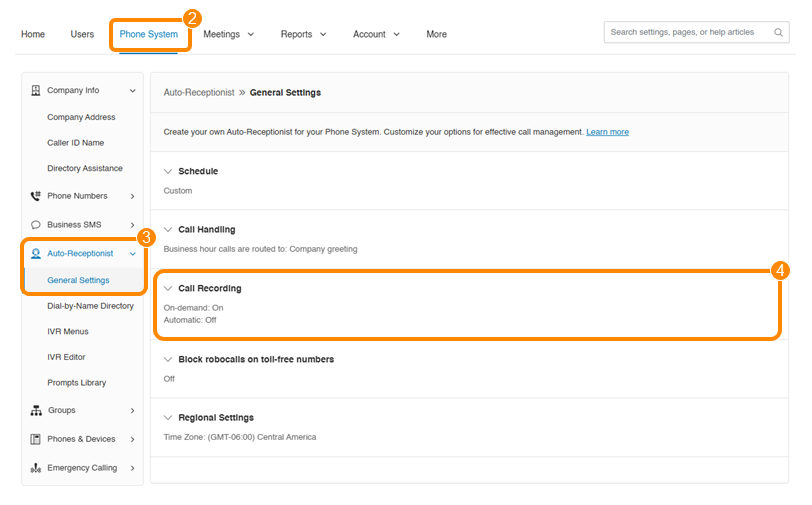
* Click the **Enable On-demand Call Recording** toggle on.
* If you want to create a custom voice message that plays when the recording starts or ends:
* Click **Edit** under Announcement on Start.
* Select *Custom* from the **Set Greeting** dropdown, then choose how you want to record the announcement.
* **Phone**: Receive a phone call to record your greeting.
* **Computer Microphone**: Record your greeting using your computer's microphone.
* **Importing**: Upload an MP3 or WAV file.
* Click **Done**.
* Follow the steps above to set up an **Announcement on Stop**.
* Click **Save** .

Setting up on-demand call recording by site
-------------------------------------------
Call recording regulations vary by geographic region. If your account includes multiple sites, you can update call recording settings for each site individually.
On-demand site recording settings apply to user extensions assigned to the same site. If a user is assigned to a different site, the new site recording settings will be applied to that extension.
* Sign in to the [Admin Portal](https://service.ringcentral.com "").
* Click the **Phone System** tab.
* Go to **Auto-Receptionist** , then click **General Settings**.
* Click the site you want to update.
* Select **Use custom call recording settings** .
Note: If you want to use the same recording settings set up for the Main site, select **Use the Main site call recording settings**.
* Update the on-demand call recording options for that site.
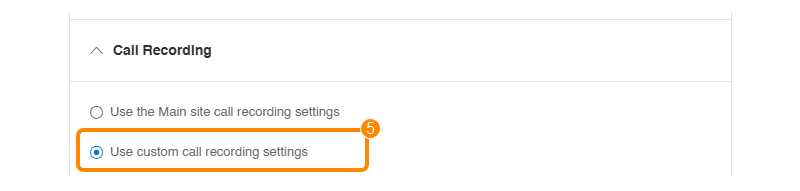
Admins with permissions to update the Main Site can choose the **Use Main site call recording settings for all sites** option to prevent other site call recording settings from being changed individually. When this option is selected, the Main Site recording settings will be applied to all sites and locked for other site admins.

**Additional resources**
[Managing call recordings in the RingCentral app and Admin Portal](https://support.ringcentral.com/article-v2/Accessing-and-downloading-RingCentral-call-recordings.html?brand=RingCentral&product=RingEX&language=en_US "")
[Recording phone calls in the RingCentral app](https://support.ringcentral.com/article-v2/Recording-phone-calls-in-the-RingCentral-app.html?brand=RingCentral&product=RingEX&language=en_US "")
## Automatic classic view
Setting up automatic call recording using the classic view
----------------------------------------------------------
Note
If you're using the new company settings layout, go to [Setting up automatic call recording](https://support.ringcentral.com/article-v2/Turning-on-on-demand-or-automatic-call-recording-.html?brand=RingCentral&product=RingEX&language=en_US&pills-nav=automatic#automatic-call-recording "").
You can set up automatic call recording to record all calls for selected user or group extensions. Automatic call recordings are saved for 90 days. Each account can save up to 100,000 recordings. Automatic call recording is only available for customers with the Advanced and Ultra plans.
* Sign in to the [Admin Portal](https://service.ringcentral.com "").
* Click the **Phone System** tab.
* Go to **Auto-Receptionist** , then click **General Settings**.
* If you have multiple sites set up, click **Main Site** to select your main company site.
* Click **Call Recording** .
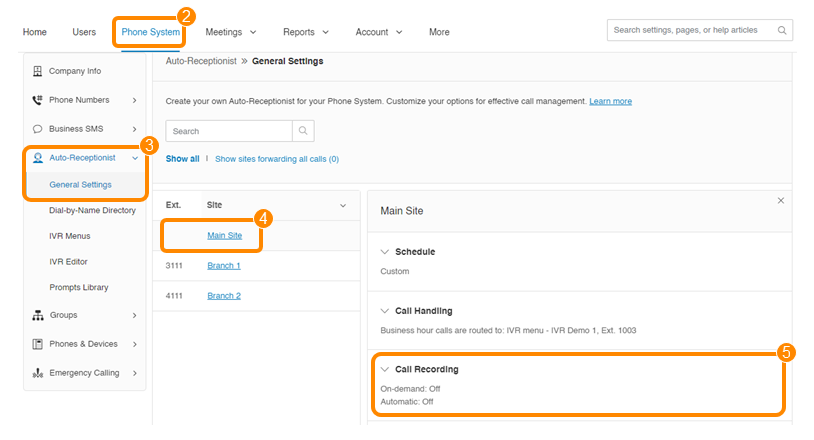
* Click the **Enable Automatic Call Recording** toggle on.
* Click **Yes** in the confirmation window.
* Check or uncheck the box next to each optional setting.
* **Play periodic tones for outbound calls**: Plays a beeping sound in fixed intervals as a reminder that the call is being recorded.
* **Play call recording announcement for outbound calls**: Plays a message informing the person answering that the call will be recorded.
* **Allow mute in auto call recording**: Allows the recording to be paused and then restarted to prevent sensitive information from being recorded.
* If you want to create a custom voice message that plays when the call starts:
* Click **Edit** under Announcement on Start.
* Select *Custom* from the **Set Greeting** dropdown, then choose how you want to record the announcement.
* **Phone**: Receive a phone call to record your greeting.
* **Computer Microphone**: Record your greeting using your computer's microphone.
* **Importing**: Upload an MP3 file or WAV file.
* Click **Edit** under Extensions to Record to add the users and groups whose calls you want to record.
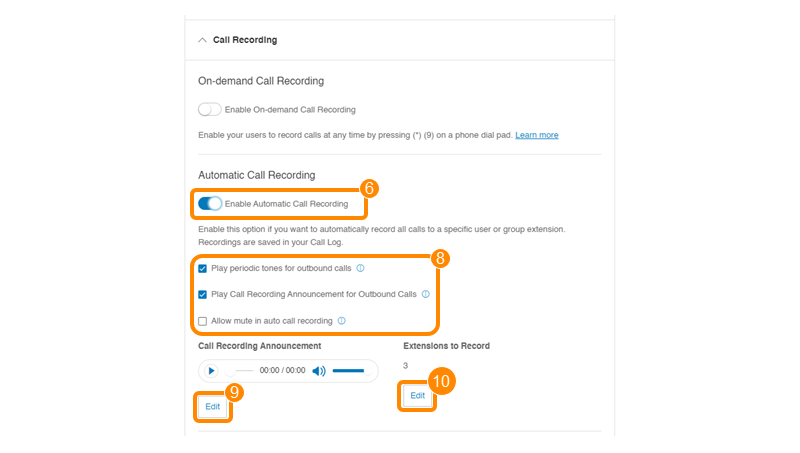
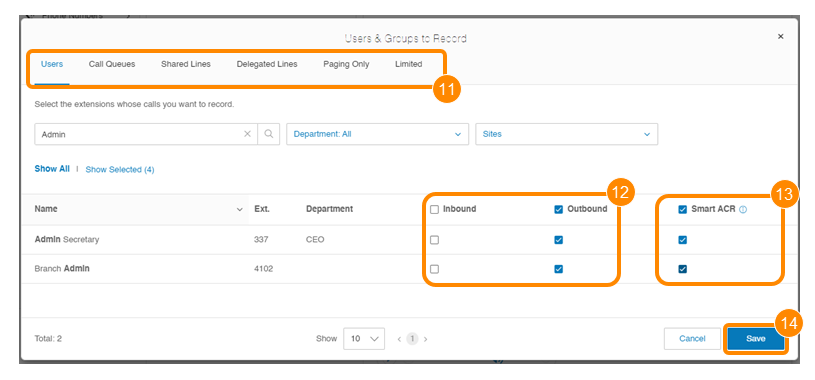
* Select a tab to add specific extensions. You can also search by name, department, and sites.
* Check the boxes under **Inbound** and **Outbound** to select the types of calls to record for the extensions. You can select the entire list by checking the boxes in the top row.
Note
Recording outbound calls is unavailable for Call Queues and Paging Only groups. If you turn on inbound automatic call recording for users assigned to a call queue, make sure you turn it on for the call queue itself as well.
* If you have outbound calls selected for extensions, you can check the boxes under **Smart ACR** .
Smart Automatic Call Recording (ACR) determines when to play a recording announcement based on the area code and number dialed. This reduces the number of times callers will disconnect after hearing a call recording notification unexpectedly.
* Calls to locations where one-party notification is required: Smart ACR will automatically record these calls. The
RingCentral
user is the party notified when the recording is started.
* Calls to locations where two-party notification is required: These calls won't be recorded.
* Click **Save** .
* Click **Save** on the main screen to complete the update.
Users will receive an email when they, or a group they belong to, is added to the list of extensions with automatic call recording turned on. This email is sent monthly to remind users that their calls are set up to automatically record.
Setting up automatic call recording by site
-------------------------------------------
Call recording regulations vary by geographic region. If your account includes multiple sites, you can update call recording settings for each site individually.
Automatic site recording settings apply to user extensions assigned to the same site. If a user is assigned to a different site, the new site recording settings will be applied to that extension.
* Sign in to the[Admin Portal](https://service.ringcentral.com "").
* Click the **Phone System** tab.
* Go to **Auto-Receptionist** , then click **General Settings**.
* Click the site you want to update.
* Select**Use custom call recording settings** .
Note: If you want to use the same recording settings set up for the Main Site, select**Use the Main site call recording settings**.
* Update the automatic call recording options for that site.

Admins with permissions to update the Main Site can choose the **Use Main site call recording settings for all sites** option to prevent other site call recording settings from being changed individually. When this option is selected, the Main Site recording settings will be applied to all sites and locked for other site admins.

**Additional resources**
[Automatic call recording FAQs](https://support.ringcentral.com/article-v2/Automatic-Call-Recording-Frequently-Asked-Questions.html?brand=RingCentral&product=RingEX&language=en_US "")
[Managing call recordings in the RingCentral app and Admin Portal](https://support.ringcentral.com/article-v2/Accessing-and-downloading-RingCentral-call-recordings.html?brand=RingCentral&product=RingEX&language=en_US "")