Video audio
=================================================================================================
Some RingCentral Video features and meeting controls may appear differently depending on your account. Learn more about [the new RingCentral Video experience](https://support.ringcentral.com/article-v2/using-the-new-ringcentral-video-meetings.html?brand=RingCentral&product=RingEX&language=en_US "").
\\\Your browser does not support the iframe element.\
For more videos like this, visit [RingCentral University](https://vimeo.com/ringcentraluniversity "").
Once you [join a meeting](https://support.ringcentral.com/article-v2/Joining-a-RingCentral-Video-meeting.html?brand=RingCentral&product=RingEX&language=en_US ""), you have several options for connecting your audio. You can also enable the *auto connect* option to automatically connect to your computer's audio when you join a meeting.
Select where you want to join
RingCentral
Video meeting audio.
## Desktop & web
How to turn on
RingCentral
Video meeting auto connect for audio
---------------------------------------------------------------------------------------------------------------------------------
To automatically connect your audio when you join a meeting:
* Go to **Settings** via the left navigation bar.
* Select the **
Video
** tab from the left pane.
* Click **Edit** to the right of **Video meeting settings** .

* Select **Audio** in the left column.
* Use the dropdowns under **Speaker and microphone combination** , **Microphone** , and **Speakers** to select your preferred audio devices. Check the box for **Automatically adjust my microphone volume** if you prefer this option.
**Note:** If the audio source for your mic differs from that of your speaker, you may experience audio problems. You'll see a prompt when your audio sources are not in sync to let you know about this issue.
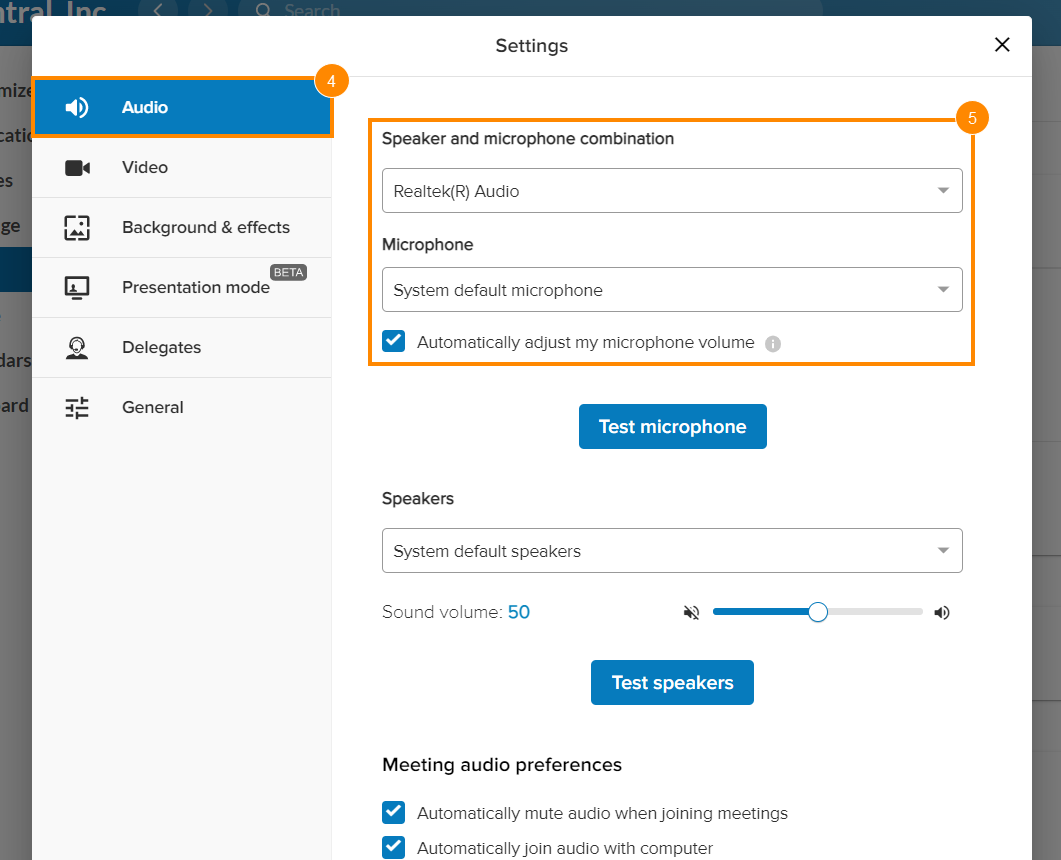
* Under **Meeting audio preferences** , make sure you've checked the box next to **Automatically join audio with computer**.
Joining options for
RingCentral
Video desktop and web
-----------------------------------------------------------------------------------------------------------------------
If you haven't turned on auto connect, you have several options for connecting your meeting audio:
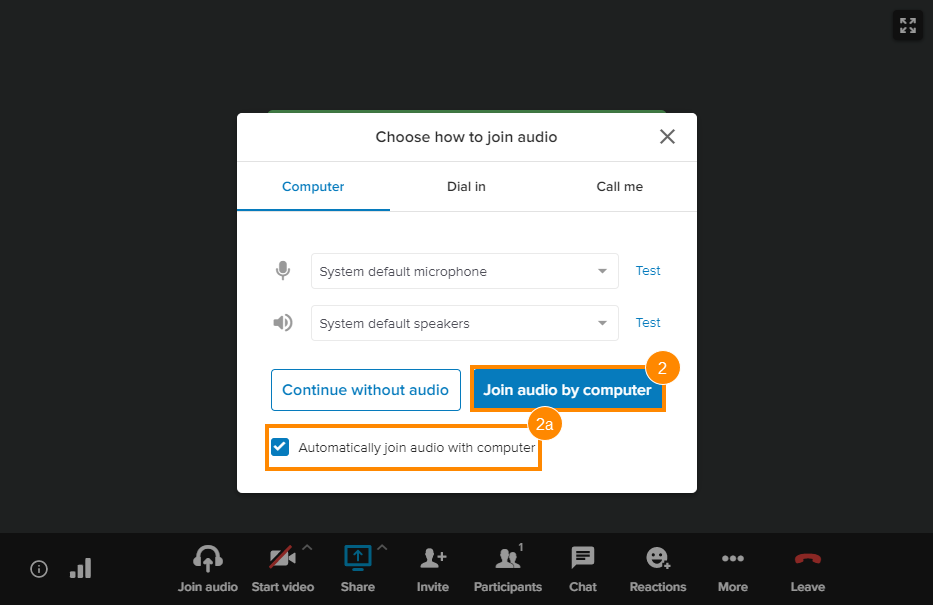
* **Continue without audio**: Join a meeting without connecting your computer audio. You may still use a phone to call into the meeting.
* **Join audio by computer**: Connect to the meeting audio using your computer.
* **Dial in** : Call into the meeting using any phone device. After you dial in, you can return to the
RingCentral
app to view the meeting.
* **Call me** : Have
RingCentral
call your preferred phone number.

How to join using your computer audio
-------------------------------------
* While in a
RingCentral
Video meeting, click **Join audio**.
* In the **Choose how to join audio** window, click the **Automatically join audio with computer** checkbox once you have selected your preferred mic and speaker options.
* Select **Join audio by computer**.
How to dial in
--------------
* While in a
RingCentral
Video meeting, click **Join audio**.
* In the **Choose how to join audio** window, click **Dial in**.
* Choose your location in the **Country** dropdown.
* Using your selected phone device, call any of the listed **Dial** numbers.
* Follow the prompt to enter your **Access code** and **Participant ID**.

How to use Call your device
---------------------------
To use the *Call me* feature to connect your audio to a
RingCentral
Video meeting:
* While in a
RingCentral
Video meeting, click **Join audio**.
* In the **Choose how to join audio** window, click **Call me**.
* Choose your location in the **Country** dropdown.
* Enter your phone number in the **Enter the number to call** field.
* Uncheck the box for **Remember this number** if you don't want to use this option.
* Click **Call me**, then accept the call on your selected device.

## Mobile
When **auto connect audio** is not enabled in the
RingCentral
Video meeting settings, you can join meeting audio using the following options:
* **Use internet audio**: Automatically connect to the meeting using your mobile data or WiFi connection.
* **Dial in** : Dial in using your mobile phone's native calling app. After dialing in, return to the
RingCentral
app to view the meeting.
* **Call me**: Have the system call the phone number you are using.
* **Continue without audio**: Do not connect to the meeting audio on your mobile phone. You may opt to dial in to the meeting using a deskphone.
How to dial in
--------------
* In the active
RingCentral
Video meeting on your phone, tap **Dial in.**

* Select a country or region. Please note that this option uses your mobile plan's minutes.
* Under **Select a number to dial,** tap **Dial in** next to the phone number you want to use.

* On the **Dial in using mobile phone?** window, tap **Dial.**

* The meeting ID will be dialed automatically. You can ignore the message that prompts you to enter your meeting ID.
How to use Call me
------------------
* In the active
RingCentral
Video meeting on your phone, tap **Call me.**

* Enter a phone number in the **Phone number** field.
* Tap **Call** , then answer the incoming call on your phone.

Note: When you select this option