Configuring live transcription settings in the RingCentral online account | RingEX
Last updated on February 22, 2022
Live transcription transcribes meeting audio in real-time. This feature is available on the RingCentral mobile and desktop and web app.
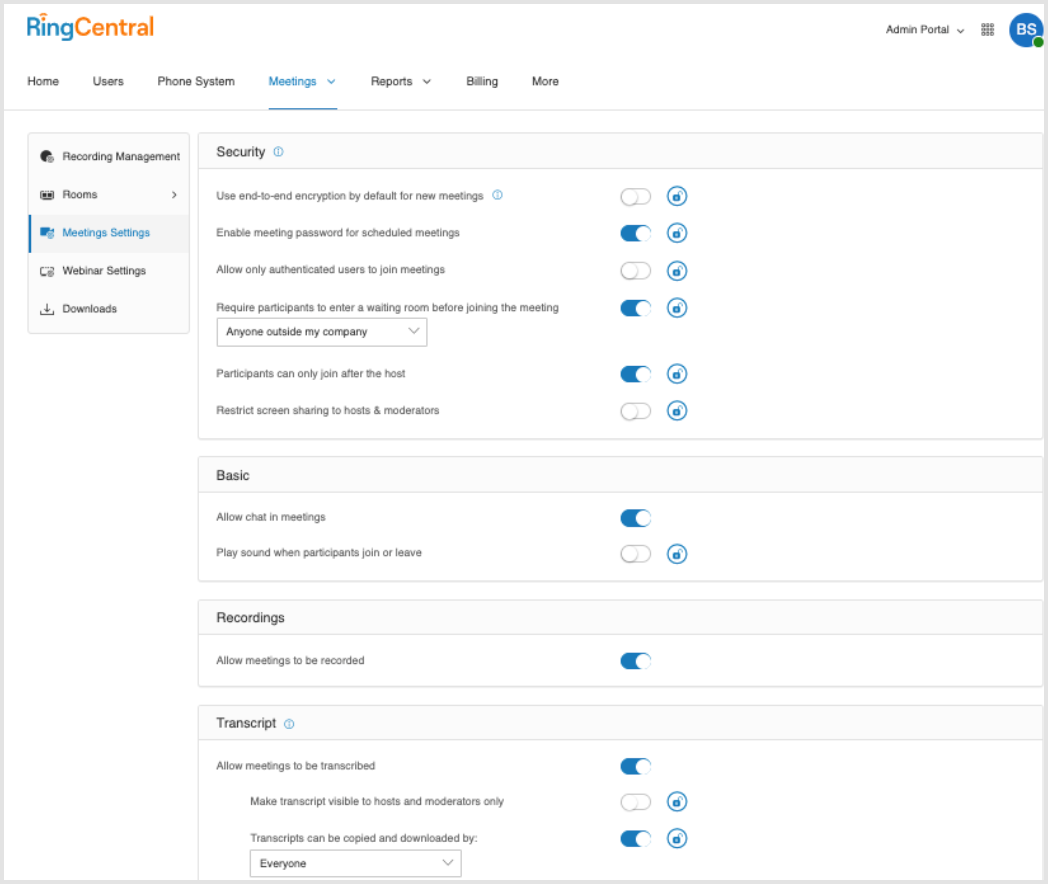
If you’re an admin, you can make changes to your live transcription settings, such as:
- Allow meetings to be transcribed.
- Make transcripts visible to hosts or moderators only.
- Allow the transcript to be downloaded or not by everyone or hosts or moderators only.
Note: An admin can update live transcription settings for the whole company account or for select users.
Configuring live transcription via Meeting settings
- Sign in to your RingCentral online account as an admin. You need to be an authorized admin user to follow the next steps.
- Click Admin Portal > Meetings.
- Click Meeting Settings, and then modify preferred settings under Transcript by toggling on/off each setting:
- Allow meetings to be transcribed
- Make transcript visible to hosts and moderators only
- Transcripts can be copied and downloaded by: Everyone or Only hosts and moderators
Note: You can click the lock icon next to each setting if you’d like to prevent any non-admin users from making changes.